Do you want to know how complicated it is to create an MCP server in python using the official MCP package?
It’s complicated because:
- the MCP server should run over stdio
- transport belongs outside
- tools live inside
- and HTTP is just a gateway layer
This blog explains how I rewired my architecture.
The Architecture
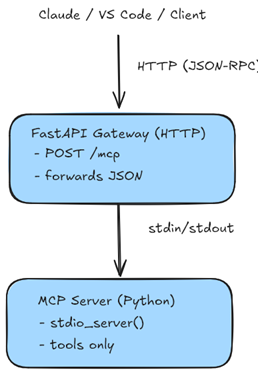
The application is composed of:
MCP Server
HTTP Gateway
Layer 1: The MCP Server
This is where:
- tables are queried
- tools are registered
- SQLite is accessed
- results are returned
For example:
import sqlite3
from contextlib import contextmanager
from typing import List, Dict, Any

from mcp.server import Server
from mcp.types import TextContent, Tool, ListToolsResult, ListToolsRequest

DB_PATH = "data_lake_config.db"

@contextmanager
def get_db():
    conn = sqlite3.connect(DB_PATH)
    conn.row_factory = sqlite3.Row
    try:
        yield conn
    finally:
        conn.close()


# ----- Core table logic -----

def get_last_import_date(table_name: str, business_line: str) -> Dict[str, Any]:
    with get_db() as conn:
        cursor = conn.cursor()
        cursor.execute(
            f"SELECT {environment} FROM table_config WHERE table_name=? AND business_line=?",
            (table_name, business_line),
        )
        row = cursor.fetchone()
        if not row or row[0] is None:
            return {"exists": False, "last_imported": None}
        return {"exists": True, "last_imported": row[0]}

def get_table_status(table_name: str, business_line: str) -> Dict[str, Any]:
    with get_db() as conn:
        cursor = conn.cursor()
        cursor.execute(
            "SELECT table_name, business_line, dev, st, uat, prod "
            "FROM table_config WHERE table_name=? AND business_line=?",
            (table_name, business_line),
        )
        row = cursor.fetchone()
        if not row:
            return {"found": False}
        return {"found": True}


def list_tables(business_line: str = None) -> List[Dict[str, Any]]:
    with get_db() as conn:
        cursor = conn.cursor()
        cursor.execute(
            "SELECT table_name, business_line FROM table_config"
        )
        rows = cursor.fetchall()
        tables = []
        for r in rows:
            tables.append({
                "table_name": r["table_name"],
                "business_line": r["business_line"],
            })
        return tables


# ----- MCP Server Setup -----

server = Server(name="demo-mcp", version="0.1.0")


# ----- Tool wrapper functions -----

async def tool_get_last_import_date(table_name: str, business_line: str, environment: str):
    return [
        TextContent(type="text", text=str(get_last_import_date(table_name, business_line, environment)))
    ]

tool_get_last_import_date.description = "Get last import date"
tool_get_last_import_date.inputSchema = tool_check_table_exists.inputSchema

async def tool_get_table_status(table_name: str, business_line: str):
    return [
        TextContent(type="text", text=str(get_table_status(table_name, business_line)))
    ]

tool_get_table_status.description = "Get complete table status"
tool_get_table_status.input_schema = {
    "type": "object",
    "properties": {
        "table_name": {"type": "string"},
        "business_line": {"type": "string"}
    },
    "required": ["table_name", "business_line"]
}

async def tool_list_tables(business_line: str = None, environment: str = None):
    return [
        TextContent(type="text", text=str(list_tables(business_line, environment)))
    ]

tool_list_tables.description = "List all tables"
tool_list_tables.input_schema = {
    "type": "object",
    "properties": {
        "business_line": {"type": "string"},
        "environment": {"type": "string", "enum": ["dev", "st", "uat", "prod"]}
    },
    "required": ["business_line", "environment"]
}

# ----- Register tools -----

server.call_tool()(tool_get_last_import_date)
server.call_tool()(tool_get_table_status)
server.call_tool()(tool_list_tables)


# ----- ListTools handler -----

@server.list_tools()
async def list_all_tools(_req: ListToolsRequest = None):
    """
    Always return all available tools in the proper MCP format.
    """
    return ListToolsResult(tools=[
        Tool(
            name=func.__name__,
            title=func.__name__.replace("_", " ").title(),
            description=getattr(func, "description", ""),
            inputSchema=getattr(func, "inputSchema", {})
        )
        for func in [
            tool_get_last_import_date,
            tool_get_table_status,
            tool_list_tables
        ]
    ])
The magic is in the Tool wrapper functions that describe the functions, input, output, etc.
Other piece of magic is the list_all_tools function that will be called from the HTTP Gateway to register the functions in the MCP Server
Layer 2: The HTTP Gateway
he gateway is thin by design.
It only:
- receives HTTP POST MCP messages
- forwards them to the stdio server
- sends back results
That’s it.
It never contains:
- database code
- tool logic (sort off)
- schemas
- MCP state
It is a stateless transport wrapper that Azure or Docker can run.
For example:
from fastapi import FastAPI, Request
from fastapi.responses import JSONResponse
from mcp import types
import uvicorn
from mcp_server import server

app = FastAPI(title="Demo MCP Gateway")


@app.post("/mcp")
async def mcp_proxy(request: Request):
    body = await request.json()
    method = body.get("method")
    request_id = body.get("id")

    # ----- Initialize -----
    if method == "initialize":
        return JSONResponse({
            "jsonrpc": "2.0",
            "id": request_id,
            "result": {
                "protocolVersion": "2024-11-05",
                "capabilities": {"tools": {}},
                "serverInfo": {"name": server.name, "version": server.version}
            }
        })

    # ----- List tools -----
    if method == "tools/list":
        # Look up the registered handler
        handler = server.request_handlers.get(types.ListToolsRequest)
        if handler is None:
            return JSONResponse({"jsonrpc": "2.0", "id": request_id, "result": {"tools": []}})

        # Call the MCP server list_tools handler
        server_result = await handler(None)
        list_result = server_result.root
        tools_list = [
            {"name": t.name, "description": t.description, "inputSchema": t.inputSchema}
            for t in list_result.tools
        ]
        print("Registered tools:", tools_list)
        return JSONResponse({
            "jsonrpc": "2.0",
            "id": request_id,
            "result": {"tools": tools_list}
        })

    # ----- Call a tool -----
    if method == "tools/call":
        params = body.get("params", {})
        tool_name = params.get("name")
        arguments = params.get("arguments", {})

        # Dispatch to MCP server call_tool handler
        handler = server.request_handlers.get(types.CallToolRequest)
        if handler is None:
            return JSONResponse({
                "jsonrpc": "2.0", "id": request_id,
                "error": {"code": -32601, "message": "tool handler not registered"}
            })

        server_result = await handler(types.CallToolRequest(params=types.CallToolParams(name=tool_name, arguments=arguments)))
        result = server_result.result

        # Build standard MCP response
        return JSONResponse({
            "jsonrpc": "2.0",
            "id": request_id,
            "result": {
                "content": [{"type": c.type, "text": c.text} for c in result.content]
            }
        })

    # ----- Unknown method -----
    return JSONResponse({
        "jsonrpc": "2.0",
        "id": request_id,
        "error": {"code": -32601, "message": f"Unknown method: {method}"}
    })

if __name__ == "__main__":
    # Run server
    uvicorn.run(app, host="0.0.0.0", port=8000)
Testing it all out
First, we start the server.
The we register the server in VS Code as MCP Server.
If everything is ok then the logs should look like:
[info] Starting server from LocalProcess extension host
[info] Connection state: Running
[info] Discovered 3 tools
And now it’s ready to use in VS Code.